
Cars.com: Buy and sell cars
Cars.comAuto & Vehicles
4.720.78K Reviews
- Version
- 26.20.0
- Installs
- 10.00M
- Age Rating
- Everyone
Screenshots




Our Review of Cars.com: Buy and sell cars
 Analysis by Appyee
When my household is looking at cars, the hard part is rarely finding something interesting; it is getting everyone to agree on what is worth a closer look. One person cares about monthly costs, another wants enough room for everyday errands, and I may be comparing several models before I am ready to contact anyone. Cars.com is useful in that early, sometimes messy stage because it brings a broad set of listings into one place and lets me browse at my own pace.
I see it as a practical car-shopping and selling app, rather than a replacement for inspecting a vehicle or talking through a deal in person. Cars.com, developed by Cars.com, is free, has a 4.7 average from around 191,000 ratings, and has been installed over 10 million times. It is rated for Everyone, though that age label does not make buying or selling a car a task for children; adults should handle decisions, inquiries, and personal information.
One phone, several opinions
A shared-device situation makes the app’s strongest use case easy to picture: a couple or household can sit together, compare possible cars, and agree on which listings deserve a follow-up. The app itself is a browsing tool, not a household planning system, so I would not assume it automatically keeps each person’s preferences or decisions separate. If several people use one phone, I’d keep a short shared note with the cars to revisit rather than relying on everyone to remember which listing caught their eye.
That small habit helps avoid a common shopping snag: mixing up two similar listings after looking at many cars in one sitting. I’d record the model, the asking details shown, and what we still need to ask the seller. It also gives the family a place to distinguish “interesting to browse” from “ready to contact,” which matters when one person is enthusiastic and another is still checking the budget.
Set expectations before browsing
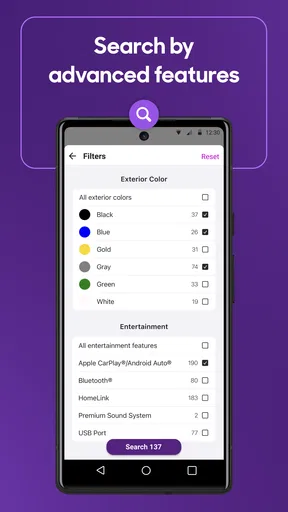
Before searching, I find it useful to agree on a realistic price ceiling, the vehicle size that fits daily life, and a few must-have features. Without those boundaries, a large inventory can turn into endless scrolling. Search filters help narrow the field by make, model, price range, and features, but they work best when the household has already decided which compromises are acceptable.
I would treat a filter as a first pass, not as proof that a car is suitable. A listing can match the features on screen and still be wrong for a commute, parking space, child-seat setup, or the amount of luggage the household carries. One helpful workflow is to start broadly, save the strongest candidates for discussion, then search again with one stricter requirement at a time. That shows whether a requirement meaningfully reduces the choices or is simply making the search too narrow.
Coordinate the next step, not just the shortlist
When a household finds a likely match, the next useful question is who will check it and when. Cars.com listings can help people compare options, and the app offers the ability to schedule test drives with dealers. I’d use that as a prompt to coordinate a visit rather than assuming a scheduled drive resolves every question. Before anyone sets out, the group should agree on what to inspect and what information still needs to be confirmed directly with the dealer.
For example, if I spot a promising car during a lunch break, I can send the relevant details to the other decision-maker and ask them to check the listing before we arrange a visit. That is more useful than forwarding a string of loosely chosen options. A shortlist of two or three genuinely different candidates can make the conversation clearer: one may suit the budget, another may offer the preferred space, and a third may be the sensible fallback if the first two do not check out.
Trust the listing enough to investigate, not enough to skip checks
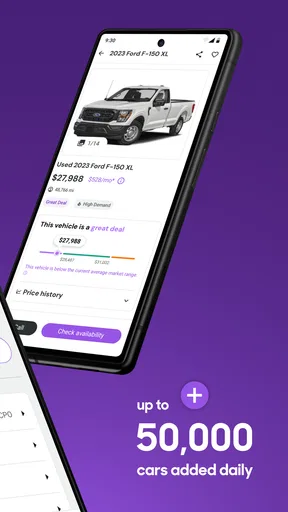
Dealer reviews and price-comparison tools are useful context, especially when I am unfamiliar with a seller or trying to understand how an asking price sits beside other options. I still see them as decision aids rather than guarantees. Reviews reflect other people’s experiences, and a comparison cannot establish a particular car’s condition. I would use the app to decide what deserves a closer look, then ask direct questions and inspect the vehicle before making a commitment.
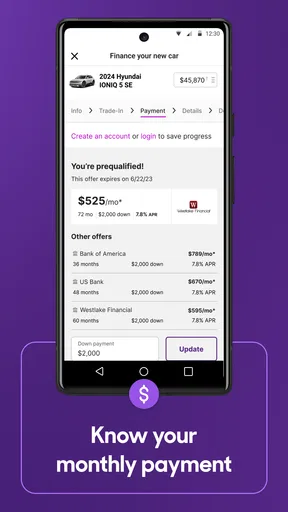
That distinction is important for first-time buyers and for anyone helping a family member shop. A detailed description and attractive photos can make a listing feel complete, but they are not a substitute for checking the car in person and understanding the terms of a purchase. If I am unsure about financing, I would treat the app’s financing options and payment calculators as a way to explore possibilities, not as a final approval or a complete picture of what I will pay. The actual terms need to be understood before signing anything.
For a household with younger users sharing a device, I would keep browsing separate from adult decisions. The Everyone rating describes the app’s content context; it does not mean a child should contact sellers, share personal details, arrange a test drive, or make financial choices. An adult can lead those steps while younger family members help compare practical features, such as seating or cargo needs.
Where it fits among the alternatives
Compared with visiting dealer sites one by one, a marketplace-style app is more convenient when I am still deciding what kind of car to pursue. It puts a variety of listings and comparison information in a single browsing experience. A dealer’s own site or a direct conversation can be more useful once I have a specific vehicle in mind and need details about that exact car, its availability, or the next steps. I would use both approaches at different points rather than expect one app to answer everything.
It is also not the right choice for someone who already knows the exact vehicle and only wants to complete a transaction with a particular seller. In that situation, going straight to the seller may be quicker. Likewise, if I want a professional inspection or a definitive valuation, I would seek that separately; an app-based estimate can be a useful starting point, but I would not treat it as a guaranteed sale price.
Your One-Stop Shop for Car Deals
So, what’s the deal with Cars.com? Right off the bat, the app offers a clean and intuitive interface. I was pleasantly surprised by how easy it was to navigate through the different sections. Whether you’re looking to buy, sell, or just browse, everything is just a tap away.
Browsing Made Easy
One of the first things I noticed was how comprehensive the search filters are. You can narrow down your search by make, model, price range, and even specific features. It’s like having a personal car shopping assistant in your pocket. And the best part? The listings are detailed with high-quality images and in-depth descriptions. No more guesswork!
In practice, I would use those details to build a comparison that is more useful than a pile of screenshots. For each candidate, I’d note the asking price, the features that matter to us, and the questions the listing leaves open. Then I would compare cars that serve the same purpose instead of judging a small car, a family vehicle, and a truck by one headline number. That keeps browsing focused on actual needs.
Selling? No Problem!
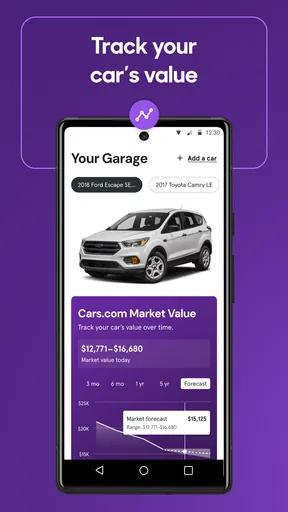
For those looking to sell their wheels, Cars.com makes the process a breeze. You can create a listing in minutes with easy-to-follow prompts. Plus, the app provides tips on how to make your car more appealing to buyers, which is a neat touch. My favorite part? The app gives you an estimate of your car’s value, so you know you’re pricing it right.
If I were preparing a listing, I’d gather the car’s details and take clear, honest photos before starting, so I could complete the prompts without stopping to search for information. I’d also read the finished description as a buyer would: does it make the car’s condition and equipment understandable, and does it avoid vague claims? The estimate is a helpful reference point, but the final price still depends on the specific vehicle and the response it gets. I would not assume that the estimate guarantees what a buyer will offer.
Selling also changes the household coordination problem. One person may write the listing while another checks the description and photos for mistakes. I would decide in advance who will respond to inquiries and how the household will handle viewings, instead of letting several people answer inconsistently. That is a simple way to keep the process organized without treating the app as if it manages the family’s roles for us.
Additional Features Worth Mentioning
Beyond the basics, Cars.com packs a punch with features like price comparison tools and dealer reviews. These features are super handy if you’re trying to score the best deal or avoid any potential lemons. The app also offers financing options and payment calculators, making it a comprehensive tool for all your car shopping needs.
My main caution is to keep those tools in their proper role. Price comparisons can help me identify a listing that deserves a question, but they do not explain every difference between two vehicles. Dealer reviews can inform my choice of whom to contact, but I would still judge the specific transaction on its own. And a payment calculator can make a budget discussion more concrete, yet I would check the actual financing terms rather than decide from an illustrative figure alone.
For a household with a firm monthly limit, I would discuss the budget before using payment estimates, not after finding a car that everyone loves. Otherwise, it is easy to become attached to a candidate before realizing it does not fit. A better sequence is to define the comfortable range, use the calculator to explore how financing might affect it, and then verify all real terms directly before proceeding.
And if you’re someone who loves test-driving before committing, the app allows you to schedule test drives directly with dealers. Talk about convenience!
I’d still confirm the appointment and the vehicle’s availability with the dealer before travelling, especially if the drive requires coordinating schedules or a long trip. For a shared household, it helps to decide who needs to attend and what each person wants to learn from the drive. A test drive is more informative when it has a purpose: one person might focus on visibility and parking, while another checks passenger comfort and access.
The Final Verdict
All in all, Cars.com is a solid app that delivers on its promises. It’s user-friendly, packed with useful features, and makes both buying and selling cars as painless as possible. Whether you’re a first-time buyer or a seasoned car flipper, this app is definitely worth a download. So why wait? Hit the download button and get ready to find your next ride or sell your current one with ease.
For me, its best role is as a starting point and organizing aid: it helps a household move from vague interest to a focused shortlist, then gives buyers and sellers practical tools for the next conversation. I would recommend it to people who want to compare options, are open to browsing, or need a place to begin a private sale. I would skip it if I only needed a direct contact for a car I had already chosen, or if I expected an app listing to replace inspection, negotiation, or financial due diligence.
The current version is 9.67.0, and the app first appeared on March 2, 2011. Those details matter less to my day-to-day judgment than whether it makes a real search easier, but they place this in a long-running car marketplace rather than a tool built around one narrow task. My household verdict is straightforward: use it to discover and compare, keep shared decisions in a separate note or conversation, and verify the important details with the seller before committing.
Happy car hunting!
Privacy and Permissions
See what permissions an app requests and how it handles your data.
- Location
- approximate location (network-based), precise location (GPS and network-based)
- Phone
- directly call phone numbers, read phone status and identity
- Camera
- take pictures and videos
- Wi-Fi connection information
- view Wi-Fi connections
- Device ID & call information
- read phone status and identity
- Other
- view network connections, full network access, prevent device from sleeping
Verdict
Strengths of Cars.com: Buy and sell cars
- User-friendly interface for easy navigation.
- Wide selection of new and used cars.
- Detailed vehicle information and history.
- Customizable search filters enhance usability.
- Secure platform for transactions and communication.
Limitations of Cars.com: Buy and sell cars
- Limited private seller listings.
- Occasional app performance issues.
- Ads can be intrusive at times.
- Some areas lack comprehensive dealer coverage.
- Requires internet for full functionality.
Similar Picks in This Category
View All
Android Auto
Google LLC4.1

maxim — order a taxi & food
PT. SITO4.7

Штрафы ГИБДД: проверка с фото
Pays LLC – Штрафы ГИБДД4.7

Номерограм – проверка авто
Авто Ассист4.8

Дром Авто
Дром4.9

Frequently Asked Questions
What features does the Cars.com app offer for buying cars?
The Cars.com app provides a comprehensive range of features for buying cars, including detailed vehicle listings, price comparisons, user reviews, and a robust search filter. Users can browse a wide selection of new and used cars, view high-quality photos, and access dealer contact information directly through the app.
How does the selling process work on Cars.com?
Selling a car on Cars.com is straightforward. Users can create a detailed listing by uploading photos, entering vehicle information, and setting a competitive price. The app offers tools to help track views and inquiries, making it easier to engage with potential buyers and complete a sale efficiently.
Is the Cars.com app free to use?
Yes, the Cars.com app is free to download and use for browsing and searching car listings. However, there may be fees associated with certain premium features, such as enhanced listing options for sellers. It's advisable to check the app for any in-app purchases or additional costs before proceeding.
Can I find car reviews and ratings on Cars.com?
Absolutely. Cars.com offers a wealth of user-generated reviews and professional ratings for various car models. This feature allows potential buyers to gain insights into a car's performance, reliability, and value from both experts and everyday users, aiding informed decision-making.
Does the app offer financing or loan options for car purchases?
While Cars.com primarily focuses on connecting buyers and sellers, it also provides access to financing information. The app includes tools and calculators to help users estimate monthly payments and explore loan options, often in partnership with financial institutions to facilitate car financing.
